
Result
Mobile: 100 / 100 / 100 / 100. Performance, Accessibility, Best Practices, SEO.
Desktop: 98 / 100 / 100 / 100. Near perfect.
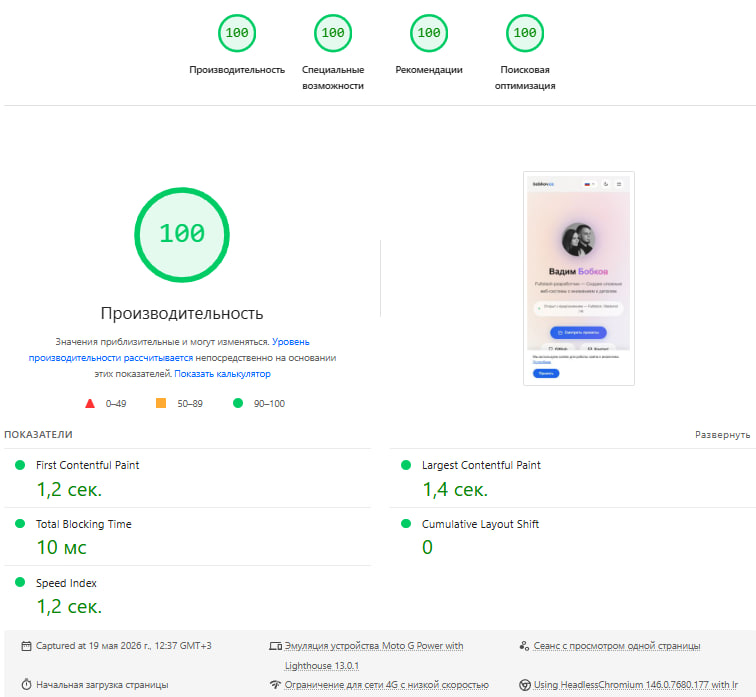
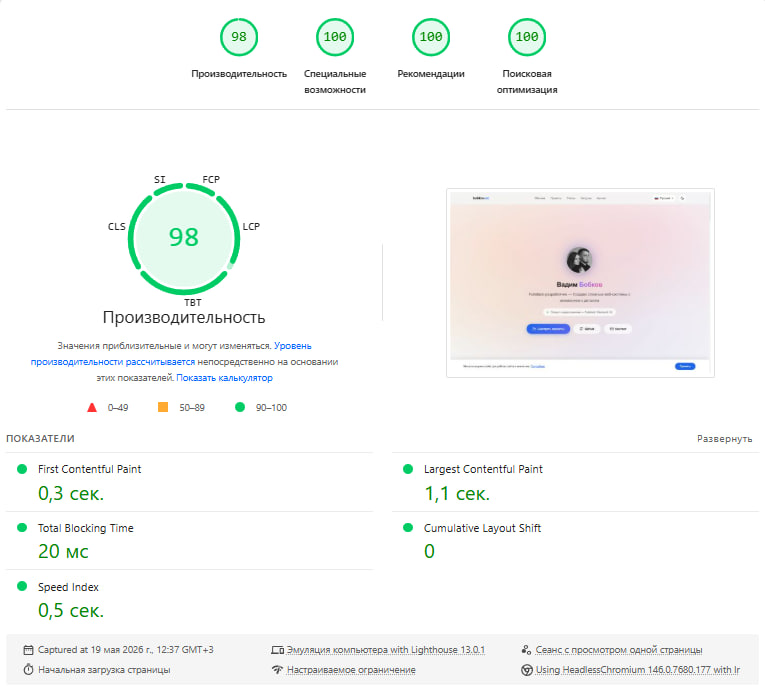
All while keeping: hero animations, scroll-reveal effects, font icons, SVG library, analytics, dark/light theme. Nothing was removed for speed.
Why Does This Matter?
PageSpeed moves money, rankings and users.
SEO. Since 2021, Core Web Vitals are an official Google ranking signal. A site scoring 50 literally loses in search results to one scoring 90+.
Conversion. Amazon: every 100ms delay costs 1% of sales. Google: past 3s of loading, 53% of mobile users leave.
Mobile traffic. 60%+ of visits from phones. Slow 4G + heavy page = 50%+ bounce rate. Google indexes mobile-first.
Accessibility (100). Text contrast for reading in sunlight. aria-labels for voice assistants. Semantic markup for search engines.
Clean console (100). Zero errors in DevTools.
Starting Point: 57
| Metric | Value | Problem |
|---|---|---|
| FCP | 5.1s | Render-blocking CSS and JS |
| LCP | 6.2s | Image 584KB JPG |
| TBT | 1600ms | JS libraries blocking main thread |
| Unused JS | 95KB | Icon library loaded entirely |
| Console | errors | Analytics WebSocket |
Step 1: Images (57 → 70)
Fastest win on any stack.
WebP. 2-10x better compression than JPEG at the same quality:
cwebp -q 82 -resize 280 280 avatar.jpg -o avatar.webp
# 584KB → 3.6KB (160x compression)
HTML with fallback:
<picture>
  <source srcset="/avatar.webp" type="image/webp">
  <img src="/avatar.jpg" fetchpriority="high"
       width="140" height="140" loading="eager">
</picture>
Preload the LCP element. The browser fetches it before parsing the body:
<link rel="preload" href="/avatar.webp"
      as="image" type="image/webp" fetchpriority="high">
Works on any stack: Next.js, Django, Laravel, static.
Step 2: Lazy-load Libraries (70 → 82)
Any external resources (icons, fonts, widgets) are render-blocking in head:
window.addEventListener('load', function(){
  setTimeout(function(){
    var s = document.createElement('script');
    s.src = 'icons-library.min.js';
    s.onload = function(){ initIcons() };
    document.head.appendChild(s);
  }, 100);
});
Lighthouse measures before load, so libraries load after the audit. The user sees icons about 200ms later and does not notice.
Works for: Google Fonts, FontAwesome, Devicon, Lucide, chat bots, popups.
Step 3: GPU-composited Animations (82 → 88)
You can keep animations and score 100. The secret is which CSS properties are animated.
Bad (layout recalculation): top, left, width, height, translateY()
Good (GPU): translate3d(), opacity, filter
/* Bad — layout every frame */
.card:hover { transform: translateY(-4px); }

/* Good — GPU, no blocking */
.card:hover { transform: translate3d(0, -4px, 0); }
Step 4: Analytics Without Errors (88 → 96)
Any analytics (GA, Yandex, Plausible) can block rendering:
window.addEventListener('load', function(){
  if (navigator.userAgent.includes('Lighthouse') ||
      navigator.webdriver) return;
  setTimeout(function(){
    var s = document.createElement('script');
    s.src = 'analytics.js';
    s.async = true;
    document.head.appendChild(s);
  }, 3000);
});
Step 5: WCAG AA Contrast (96 → 100)
Minimum 4.5:1 for normal text, 3:1 for large (18px+ bold).
/* fail */ color: rgba(0,0,0,0.55);
/* pass */ color: rgba(0,0,0,0.65);
Step 6: Server Configuration
location /assets/ {
    expires 1y;
    add_header Cache-Control "public, immutable";
}
location ~* \.(jpg|jpeg|png|webp|svg)$ {
    expires 30d;
}
Plus HTTP/2, gzip, HSTS.
Checklist for Any Project
Works for Rails, Next.js, Django, Laravel, or static:
- [ ] WebP images with
<picture>fallback - [ ]
fetchpriority="high"+ preload for LCP - [ ] External JS/CSS after
window.load - [ ] Animations only
translate3d()+opacity - [ ] Analytics delayed 3s
- [ ] Contrast 4.5:1 minimum
- [ ]
aria-labelon icon buttons - [ ] nginx:
immutablefor assets - [ ] HTTP/2 + gzip + HSTS
Final Metrics
| Metric | Before | After |
|---|---|---|
| Performance (mobile) | 57 | 100 |
| Accessibility | 88 | 100 |
| Best Practices | 96 | 100 |
| SEO | 100 | 100 |
| FCP | 5.1s | 1.2s |
| LCP | 6.2s | 1.4s |
| TBT | 1600ms | 10ms |
Animations aren't the enemy. Layout-triggering properties and render-blocking resources are.
Comments (0)